The platform

The maths education infrastructure
your school can’t prompt into existence.

SeedTree is a school workflow platform built around the STOP Method™. Generic AI app builders can ship a quick interface; they cannot ship 10+ years of curriculum-aligned content, a trademarked methodology, or the school-grade workflow patterns that hold up to audit.

Three moats. None of them prompt-replicable.

829+ generators

Across 12 categories. SVG diagrams natively rendered. 10+ years of accumulated curriculum coverage from Year 3 to Year 12.

STOP Method™ trademarked

Methodology IP filed (2026-04-10). Research-backed (expert blind spot, conceptual blending). 3-Tier Diagnostic Taxonomy is the platform evaluation grammar.

School-grade workflow

Enterprise-level customisation designed for school operations — not a generic app you could rebuild with prompts.

Not a mock — the actual product

What the platform renders

Every exercise is delivered from the server and rendered as a guided scaffold — the student’s working memory is externalised into on-screen cells so the method, not the arithmetic, is what they practise.

Server-driven UI

Guided scaffolds, streamed from the server
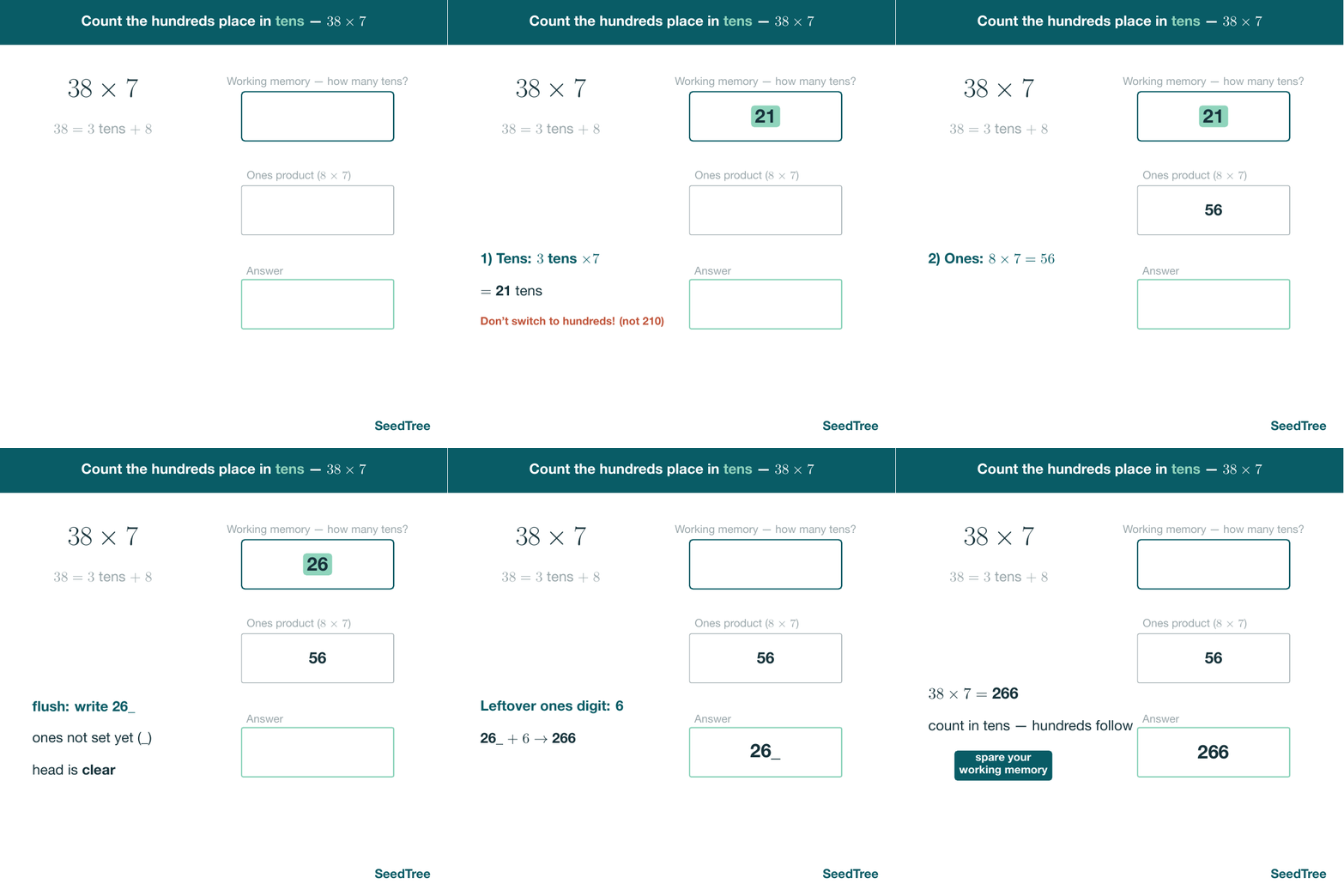
Content is authored once and delivered to the app at runtime — so a scaffold can be fixed, extended, or retuned without an app-store release. Here, mental multiplication is broken into a working-memory cell, a ones-product cell, and the answer, exactly as the STOP Method sequences it.
SeedTree exercise player
Step-by-step mental multiplication scaffold rendered from the server: a working-memory panel, an ones-product cell, and the running answer for 38 times 7.

Exercise policies

One step at a time, with the head kept clear
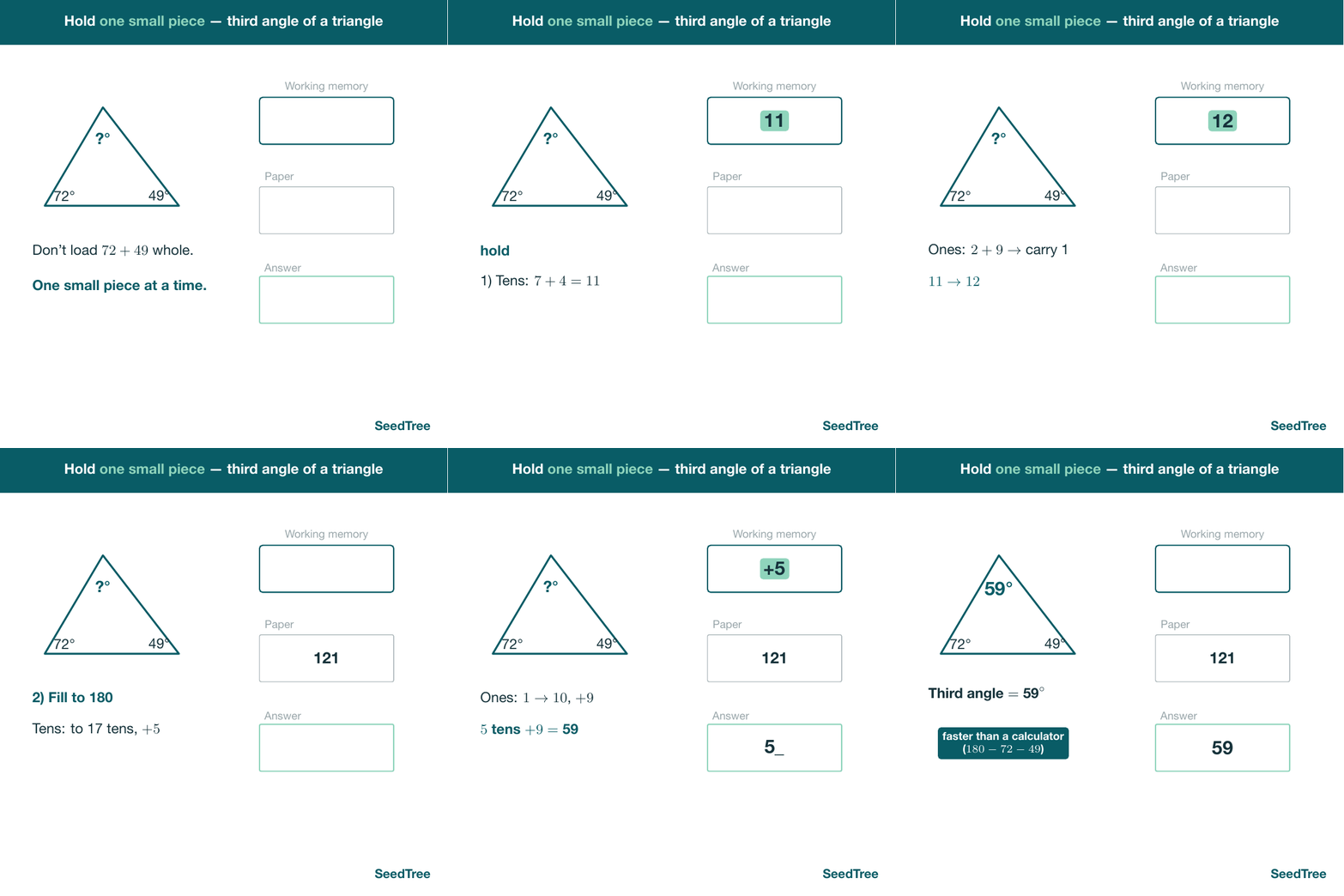
Schools set retry behaviour, hint policy, and acceptance criteria per topic; the player enforces them step by step. In this angle-sum scaffold the working-memory panel is deliberately emptied once a partial result is written down — the platform teaching the habit, not just checking the answer.
SeedTree exercise player
Guided scaffold for finding the third angle of a triangle from its angle sum, with a working-memory panel that is cleared once the partial total is recorded.

STOP Method™ content

Structural working, not rule memorisation
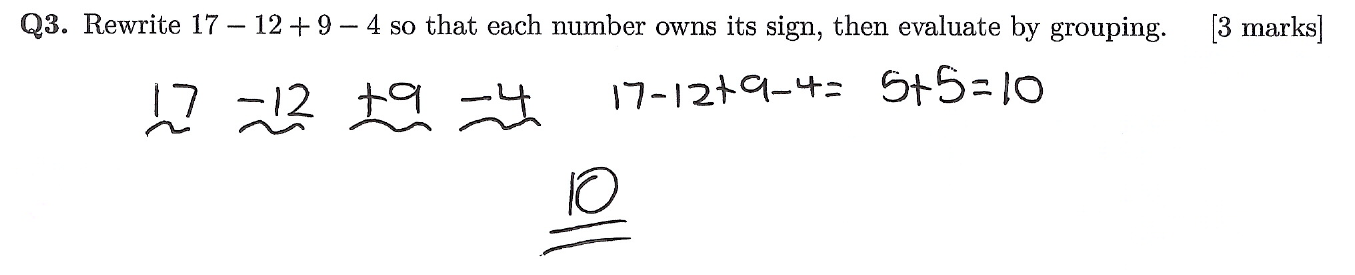
The same methodology that drives the digital scaffolds is authored across the curriculum library. Each term is made to “own its sign” before it is grouped — a structural move students can apply everywhere, rather than a rule they memorise for one question type.
STOP Method worked example: rewriting 17 minus 12 plus 9 minus 4 so each term owns its sign, then evaluating by grouping to get 10.

Sample from the STOP Method curriculum library

Interactive area model

Two-digit × one-digit, built on the rectangle
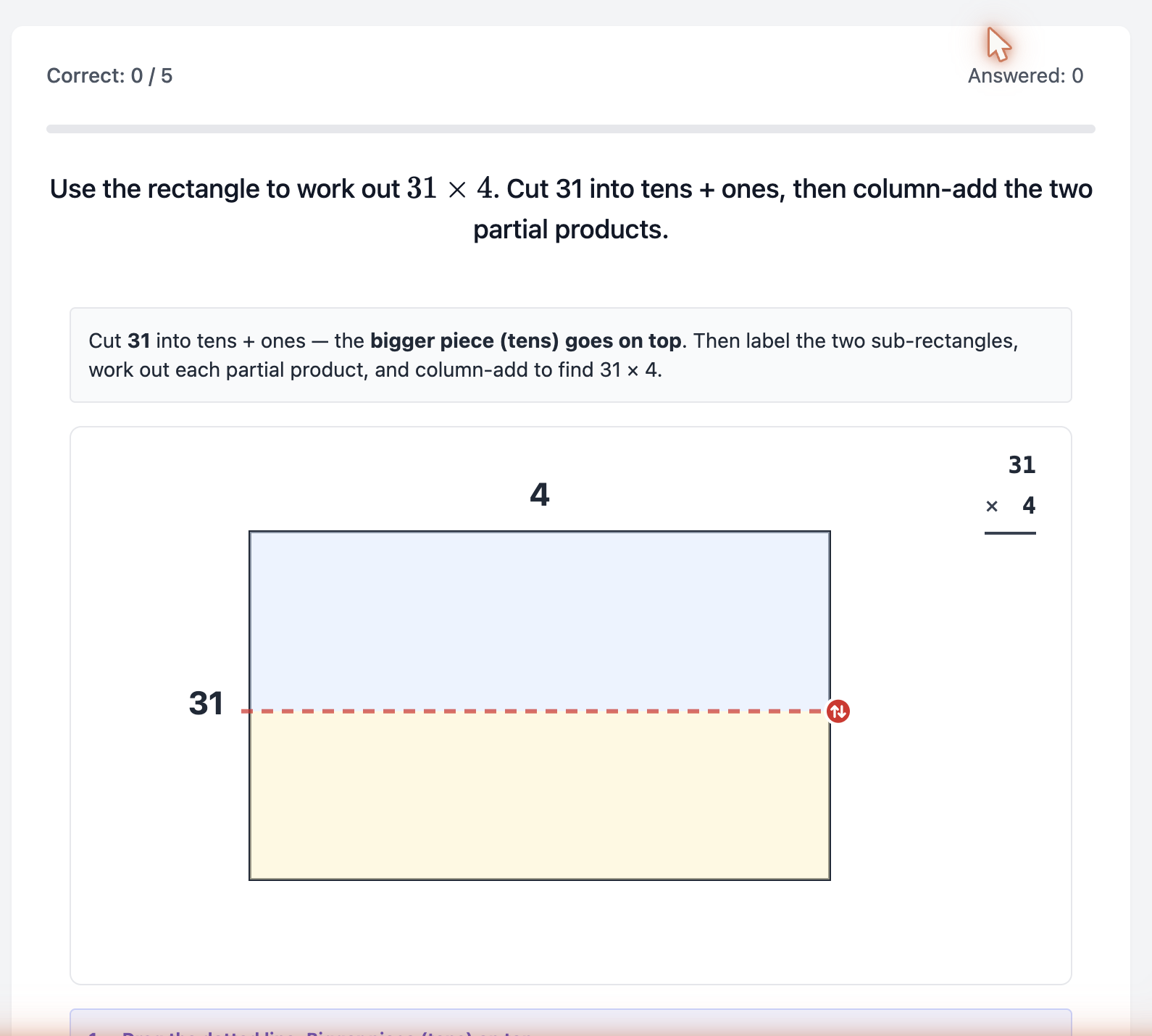
The 2-digit × 1-digit split is taught on an interactive area model: the student drags the cut line to split 31 into tens + ones, labels the two sub-rectangles, works out each partial product, and column-adds — the same move the paper workbook teaches, made manipulable on screen.
SeedTree exercise player
Interactive area-model scaffold for 31 times 4: a rectangle with a draggable cut line splitting 31 into tens and ones, beside a column-addition form.

Concept → mental fluency

Then the same product, trained mentally
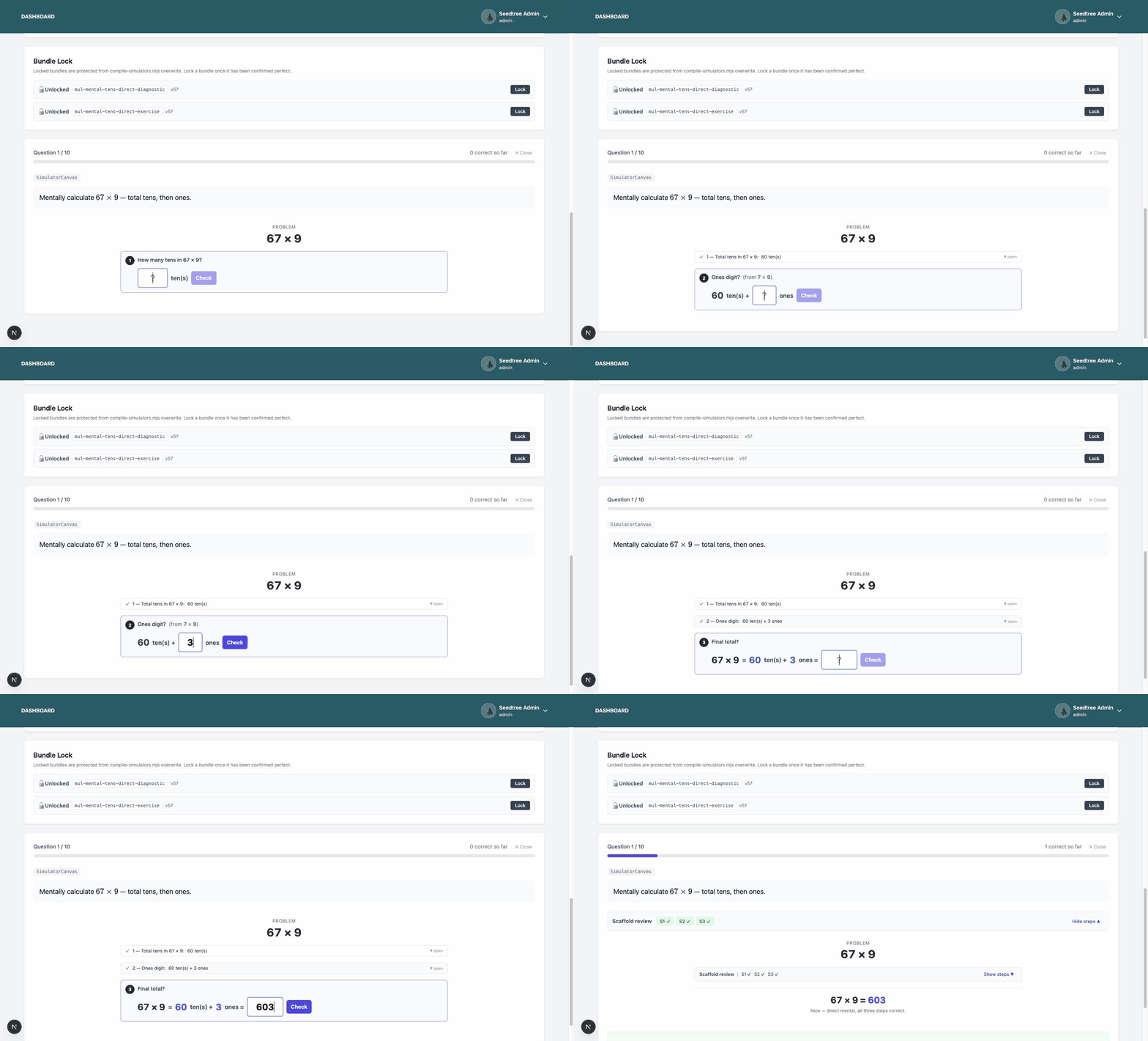
Once the rectangle makes sense, the same 2-digit × 1-digit product moves to the final mental stage — counting the tens: total tens, then the ones digit, then the answer. Three thoughts, no written working. Understanding first, then automaticity.
SeedTree exercise player
Fully mental count-the-tens trainer answering 67 times 9: total tens 60, ones digit 3, final answer 603 — three steps, no written working.

Anchor-number fluency

Filling up to the numbers that carry the maths
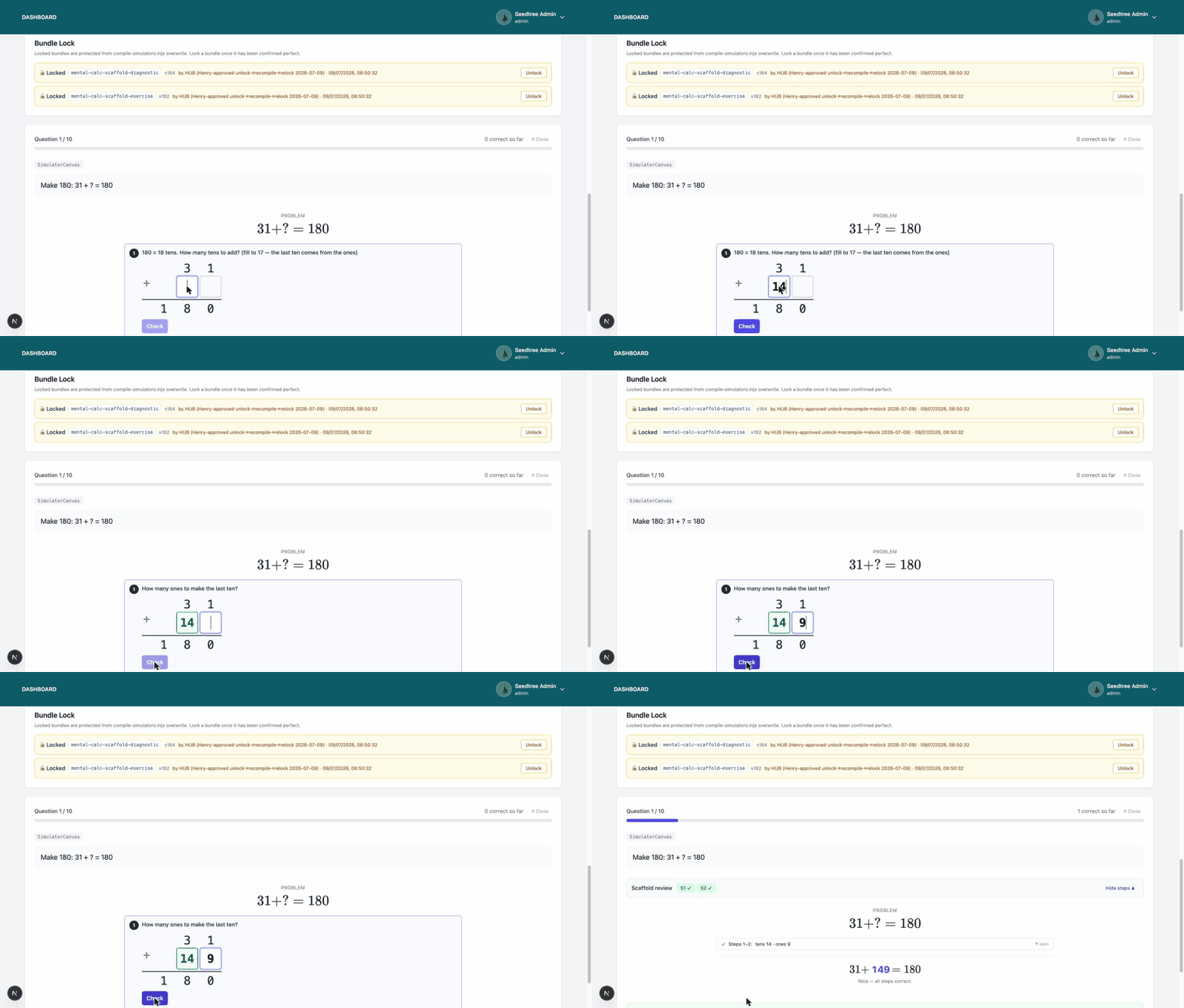
A handful of numbers do outsized work in secondary maths — 60, 90, 100, 180, 360. The platform drills their complements the structural way: think of 180 as 18 tens, fill the tens, let the ones supply the last one. The same fill-up move that later powers angle sums and time calculations.
SeedTree exercise player
Anchor-complement scaffold answering make 180: 31 plus what equals 180, worked in a column form — fill the tens to 17 first, then the ones supply the last ten, revealing 31 plus 149 equals 180.

Diagnostic review

Every step, marked back to the student

In diagnostic mode the scaffold never interrupts mid-working — the student answers the whole chain, then the review lays their steps beside the expected ones so a teacher can see exactly where the method broke, not just that the final answer was wrong.

Diagnostic review screen

Product capture in progress
/static/platform/diagnostic-review.png

Completion templates & catalog

School-grade configuration, no code required
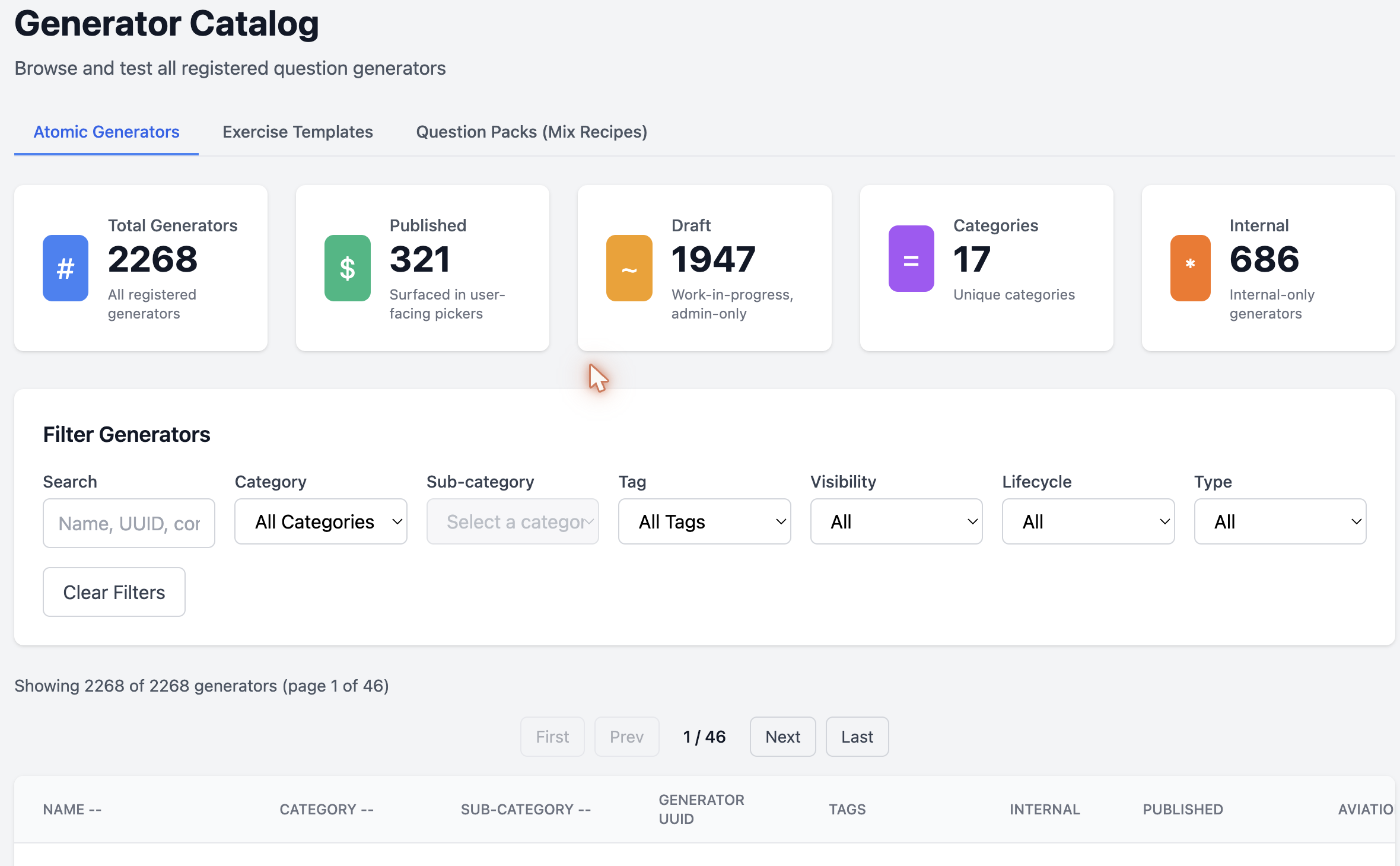
Behind the exercises sit the catalog of generators and the completion-template hierarchy: system defaults, school-level overrides, and a student-level fallback chain — all editable from the admin surface without touching code.
SeedTree exercise player
Generator Catalog admin screen: 2,268 registered generators with published, draft, category and internal counts, plus search and filter controls over the full table.

Detailed platform documentation publishing in Phase B of our marketing site rollout.

The teacher-builder surfaces

The same platform, opened up for teachers.

SeedTree Studio runs on this platform — the PD teachers train with is the tooling they teach with. Three surfaces make that possible.

The editor (Tier 3 fork)

Teachers fork any lesson and customise the prompts, text, and examples — or author entirely new lessons. Their work follows them between schools; the school keeps an institutional library. Hybrid opt-in publishing keeps authorship with the teacher.

Teaching-version simulator

The exact same scaffold students use, switched into teacher mode: value-edit and step control for classroom projection. The tool a teacher trained on is the tool they present with on Monday.

Studio tenant

Studio is a platform-internal, SeedTree-owned PD tenant on the same multi-tenant architecture. It proves multi-tenancy at scale before partner schools deploy — the platform dogfooding its own PD.

Teaching mode

The student scaffold, switched to the front of the room

The teaching-version simulator is the identical scaffold with value-edit and manual step control turned on, sized for classroom projection — so the tool a teacher trained on in PD is the tool they present with on Monday.

Teaching-mode simulator

Product capture in progress
/static/platform/teacher-simulator.png

Built and proven at SeedTree Academy

SeedTree Academy is our internal Premium school. Every platform feature is dogfooded there before it reaches partner schools.